Hawaii - Minor (22.14)
Release Summary
Kaptio is proud to announce that in this release, we have introduced two new features for Group Touring: Price Model Record Type Support and Price Model Room Pricing.
See New Features, Minor Changes and Bug Fixes for more information.
Deployment Guide
See this page for the Hawaii Deployment guide.
New Features
Feature: Group Tour: Price Model Record Type Support [Pilot]
Overview
The Price Model Record Type Support enhancement enables different layouts on Create/Edit Price Model modal windows based on record type. This reduces user errors during group tour creation or editing by presenting only relevant fields for each record type. The feature leverages existing custom settings for Price Model record types and provides a streamlined record type selection process during creation.
Add several Price Model record types support (GTT-497)
Business Context: Users need different layouts on Create/Edit Price Models modal windows based on record type to reduce errors during group tour creation or editing.
Step-by-Step Process:
-
Create New Price Model
-
User initiates Price Model creation
-
Record Type Selection: Additional window in the flow presents available record types
-
Only record types defined in "Price Model record IDs" custom setting are available
-
-
Layout Based on Record Type
-
Modal window displays layout assigned to the selected record type
-
Lightning form support provides appropriate fields for each record type
-
Edit actions also use the record type-specific layout
-
Post-Deployment Steps:
-
Update required Page layouts on Itinerary object on subscribers org if needed
<value>IsPriceModel__c|EQUALS|true</value>ItineraryPage Group Builder and Pricing Overview tab filters to: <criteria>
     <leftValue>{!Record.IsPriceModel__c}</leftValue>
     <operator>EQUAL</operator>
     <rightValue>true</rightValue>
 </criteria>
Make option type mandatory during optional configuration creation (GTT-609)
Business Context: Previously, optional configurations could be created without specifying an option type, leading to incomplete data.
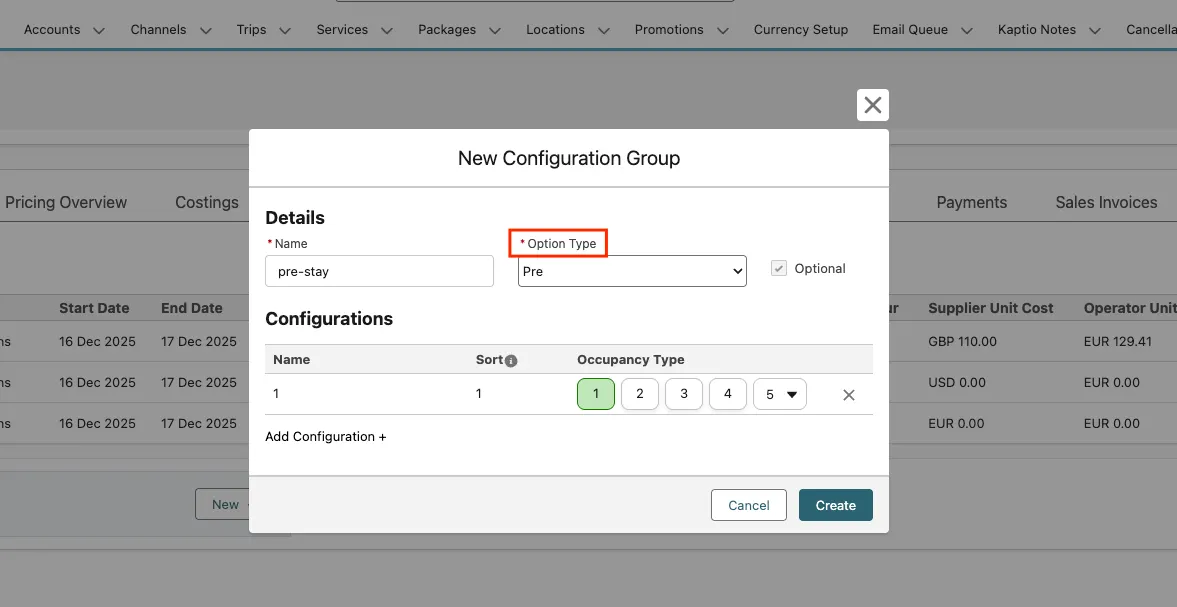
Enhancement:
-
Option type field input is now required in the UI
-
Validation prevents saving without selecting an option type
-
Ensures consistent data for all optional configurations
Feature: Group Tour: Price Model Room Pricing [Pilot]
Overview
Price Model Room Pricing introduces the ability to configure how room pricing is calculated for partial occupancy scenarios. This feature adds a new pricing option that allows tour operators to define whether a single person in a double room pays for the full room or only their portion. The enhancement includes new fields on Account and CalloutRequest objects, UI updates to the Pricing Overview tab, and integration with the calculation API to ensure accurate pricing based on the selected room pricing model.
Add field PriceModelRoomPricing__c to the Account and CalloutRequest__c objects (GTT-584)
Business Context: The system needs to store the room pricing preference at both the Account level (default) and CalloutRequest level (per calculation) to support flexible pricing configurations.
Data Model Changes:
-
New Field on Account Object
-
Field Name: PriceModelRoomPricing__c
-
Label: Price Model Room Pricing
-
Type: Picklist
-
Values: Full Room, Partial Room
-
Default Value: Full Room
-
Help Text: For a double room case for "Full Room" option 1 person pays for 1 room. If the value is "Partial Room" 1 person pays for 0.5 room.
-
-
New Field on CalloutRequest__c Object
-
Field Name: PriceModelRoomPricing__c
-
Label: Price Model Room Pricing
-
Type: Picklist
-
Values: Full Room, Partial Room
-
Default Value: Populated from primary account selected in the Price Model
-
Help Text: Same as Account field
-
Post-Deployment Steps:
-
Add the new Account field manually to required page layouts
UI: Add fields "Price Model Room Pricing" on Account layout and Pricing overview tab (GTT-585)
Business Context: Users need to see and modify the current Price Model Room Pricing value directly from the Pricing Overview tab to set correct expectations for calculations.
Step-by-Step Process:
-
View Current Setting
-
User opens the Pricing Overview tab on a Price Model
-
"Price Model Room Pricing" field is displayed above Calculation Prices section
-
Value is populated from CalloutRequest__c object
-
-
Modify Setting
-
User can override the value directly in the UI
-
Changes are saved to the CalloutRequest__c object
-
Subsequent calculations use the updated value
-
Adjust callout requests with price_model_room_pricing parameter (GTT-586)
Business Context: The calculation API needs to receive the room pricing preference to ensure Price Model calculations reflect the correct pricing model.
API Integration:
-
Parameter:
price_model_room_pricingadded as a top-level parameter -
Affected Callouts:
-
Bulk Calculate Prices
-
Bulk Calculate Seasons
-
Behaviour: Price Model output calculation performed with respect to the parameter value
Minor Changes
Feature: Cabin Allocation tool
Data model changes to group Itineraries (GTT-595)
Added TravellingTogetherGroup__c field on Itinerary__c object
Create a component for Itinerary to group records together (GTT-596)
Added component for Itinerary to group records together
Add linked itineraries field in Cabin Allocation tool (GTT-597)
Added a “Trav. Together” column to the passenger grid in Cabin allocation tool showing the group name
Code refactoring to imporve the performance in CAT (GTT-622)
Implemented virtual scrolling in order to improve performance on the Cabin And Seating table
Feature: Operational itinerary
Overview
The Operational Itinerary Improvements include restrictions to prevent cloning (which would break the Price Model link), enhanced error handling for re-evaluation responses etc. These enhancements improve data integrity, provide better visibility into calculation errors, and speed up the re-evaluation process.
Configuration can’t be deleted if service or pax from operational itinerary is assigned to it (GTT-576)
Business Context: Configurations with active assignments in operational itineraries must be protected from deletion to maintain data integrity.
Validation Rules:
-
User cannot delete configuration if any operational itinerary assignment exists
-
Checks both service assignments (ItinConfigItinItemAssignmentc) and passenger assignments (PassengerConfigurationAssignmentc)
-
Error Message: "You can’t delete a configuration which is used in operational itinerary"
Operational Itinerary can’t be cloned (GTT-589)
Business Context: Operational Itineraries rely on the Original link to Price Model. Cloning would break this link, causing the cloned itinerary to malfunction.
Restriction:
-
Cloning an operational itinerary is now forbidden
-
Error Message: "It’s not possible to clone an operational itinerary"
-
Protects data integrity by maintaining required Price Model relationships
Error handling for re-evaluation response (GTT-605)
Business Context: Users need visibility into errors thrown by the API for particular services during re-evaluation to react timely and address issues.
Problem Addressed:
-
Previously, service-level errors weren’t surfaced to users
-
Overall calculation status showed success even when individual services had errors
-
Example: Pax assignment errors when a child is placed in a separate room
Solution Implemented:
-
Status Update: If any service re-evaluation has an error, overall itinerary re-calculation status is set to error
-
Error Details: Service API error details are saved to the recalculation error field
Refactoring in operational re-evaluation functionality to prvent heap size error (GTT-638)
Reduced heap size usage during Operational Itineraries revaluation
Feature: Inventory Management
Support Tour Departure record in Inventory LWC (GTT-612)
Business Context: Users need to quickly check inventory linked to particular tour departures to verify correctness and completeness.
Enhancement:
When Inventory LWC is placed on a Tour Departure record layout:
-
Departure Date: Auto-populated with date from tour departure
-
Group Tour: Auto-populated with tour linked to the tour departure
Feature: Passenger Grid: Passenger import
Overview
The Passenger Import Enhancements address differences between REST API and Excel file import matching logic, providing more appropriate duplicate handling for each import channel.
Passenger Duplication Handling (GTT-649)
Business Context: Different import channels require different matching rules to balance between avoiding missed matches and wrong merges.
Matching Logic Changes:
REST API Import:
-
Only matches an incoming passenger when a specific Passenger Id is supplied
-
Prevents accidental updates to existing records
-
Previous matching rules (passport, email, name+DOB) no longer apply for API
Excel/Bulk Import:
-
Maintains richer matching logic with two safety checks:
-
Full Name + Date of Birth + Email
-
Full Name + Date of Birth + Passport
-
-
Reliably aligns spreadsheet rows with existing travellers
Key Benefits:
-
Reduces both missed matches and wrong merges
-
Channel-appropriate matching behavior
-
Greater control over record updates via API
Feature: Service Departures
Add Lightning page for Service Departure object (GTT-601)
Added Lightning page for Service Departure object
Feature: Service Departures, Timetable
Move "Create Timetable" feature to the modal window (GTT-599)
Remove from packaging and subscribers org CreateTimetable tab
"Edit Timetable" option (GTT-600)
Added ability to edit Timetable: Service Departure and Service Departure Ops Locations related records in modal window
Bug Fixes
Price model output doesn’t anticipate multiple tour departures on the same date (GTT-501)
Business Context: When multiple tour departures exist on the same date, the system maps it based on dates instead of tour departure record ids.
Resolution:
-
Added logic to handle
tour_departure_idvalue from KTAPI -
Price Model outputs now created in accordance with this value
Related Support Ticket: KHELP-12123
Wrong prices on Bulk replace action with cumulative prices (GTT-544)
Business Context: Using the Replace Bulk action on items with cumulative prices resulted in incorrect pricing on changed and related services.
Resolution:
-
Fixed Replace Bulk Job after implementing cumulative pricing
-
Prices now correctly calculated after bulk replace operations
Cumulative prices shown on Add Service modal on Costings tab (GTT-546)
Business Context: Cumulative prices were incorrectly displayed in the Add Service Modal, though correct prices were applied when selecting the service.
Resolution:
-
Turned off cumulative pricing display in Add Service modal in Costings
-
Eliminates user confusion from seeing preliminary cumulative prices
Date on Inventory Table returning as actual date -1 for certain users (GTT-591)
Business Context: Users in timezones behind GMT (North America) saw incorrect dates in the Inventory Table (actual date minus one day).
Resolution:
-
Fixed timezone and next year switch bugs in date range dual calendar LWC
-
Affects: Bulk Manager, Inventory table, Combo tours, Pricing Overview
-
Dates now display correctly regardless of user timezone
Operational Itineraries are being created with Booking = False (GTT-607)
Business Context: When creating an Operational Itinerary via "Create Operational Itineraries" button, the Booking field was incorrectly set to False.
Resolution:
-
Set Booking__c = TRUE by default when creating Operational Itineraries
-
Aligns with intended behaviour for operational bookings
Incorrect fallback code status in popover in Inventory LWC (GTT-611)
Business Context: The release fallback status was displaying incorrectly in the contract info popover.
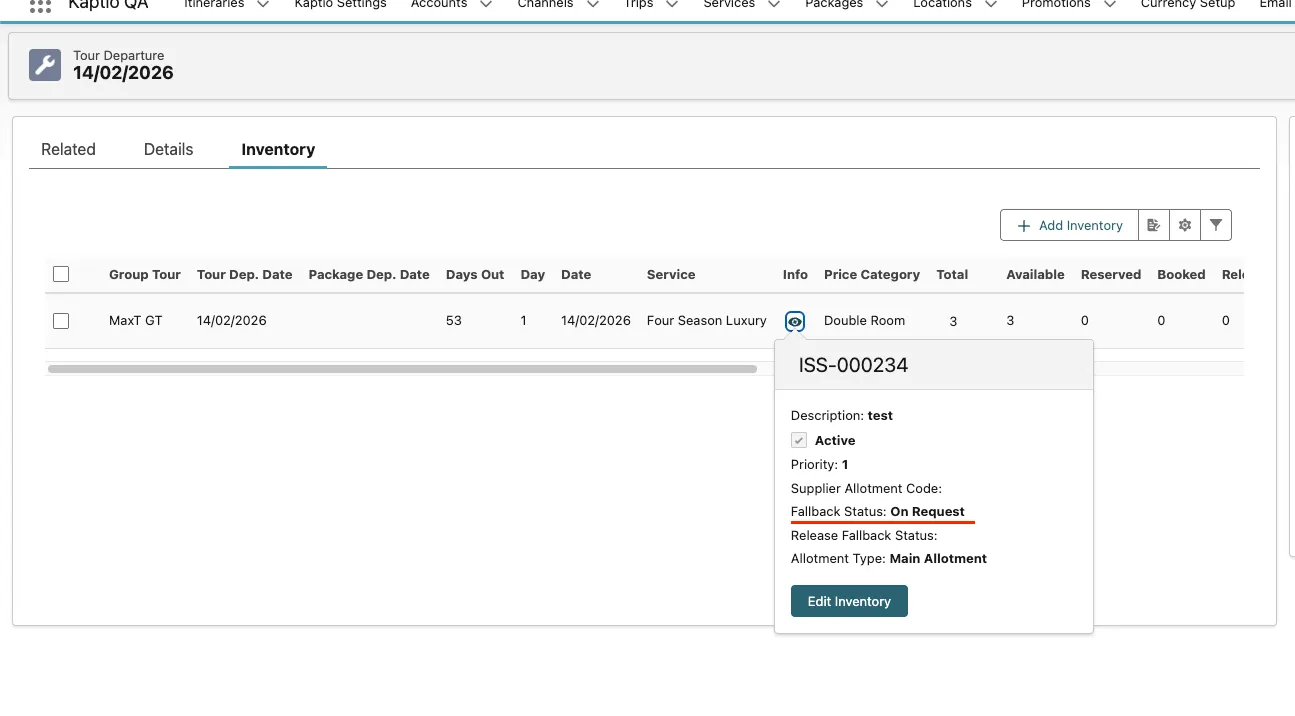
Resolution:
-
Added correct mapping of release fallback status field for contract info popover
-
Contract information now displays accurate status values
Crew member channel role validation fix (GTT-632)
Business Context: Previously, channel role’s name had to match crew requirement name exactly. If no such channel role existed, an error was thrown preventing operational itinerary creation.
Resolution:
-
If any channel role exists, operational itinerary can be created
-
Channel role assignment to crew requirement record proceeds without exact name matching
Lines with Quantity behaviour = standard cause re-evaluation fails (GTT-648)
Business Context: Services with Standard quantity behaviour caused re-evaluation errors due to null pax-service assignments.
Resolution:
-
Fixed logic to handle null pax-service assignments for Standard quantity behavior lines
-
For Standard qty behavior lines, pax-service assignments are not changed by OI re-evaluation process
-
User maintains manual control over assignments for standard lines
Passenger import: Updating and Creation don’t work correctly in one API request (GTT-659)
Business Context: When an API request contained both new and existing passengers, the import worked incorrectly - data was swapped between records.
Resolution:
-
Fixed passenger import to handle creating and updating passengers in a single request
-
Each record now correctly uses its own data from the request