Iceland - Minor (23.0)
Release Summary
Kaptio is proud to announce this minor release for Iceland. This release is intended to address issues with previous releases.
See Minor Changes and Bug Fixes for more information.
Minor Changes
Feature: Booking Wizard
TemporaryHoldCallableApi: serialize results before return to fix consumption from basket-api-persistence (ST-3079)
TemporaryHoldCallableApi now returns serialization-safe payloads so external apps can consume temporary hold results without package DTO types.
Booking Overview shows similar price lines for a Package (ST-3055)
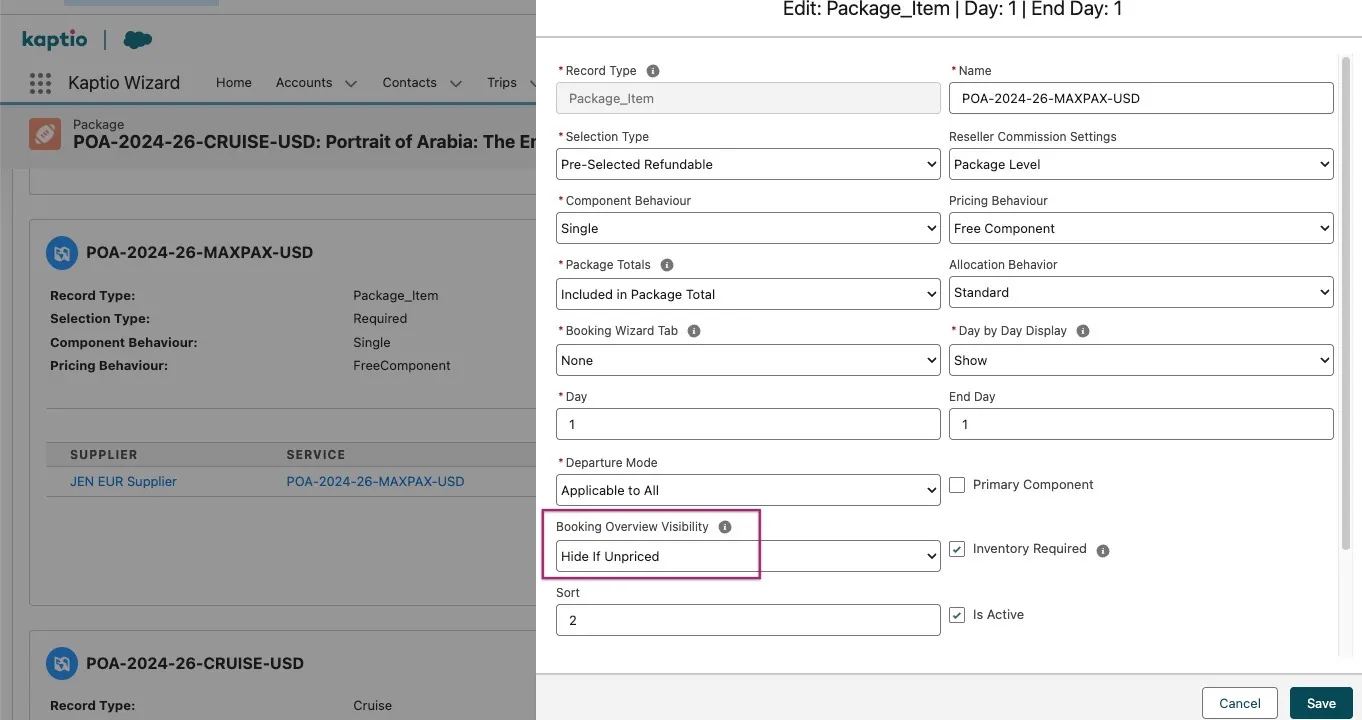
A new Booking Overview Visibility picklist field has been added to the Component object. It controls whether a component’s items are shown in the Booking Overview.
| Value | Behaviour |
|---|---|
Show (default) |
Items always appear in the Booking Overview. Null/empty is treated as Show. |
Hide If Unpriced |
Items are hidden from the Booking Overview only when their total price is zero. Any item with a non-zero price remains visible. |
| The default will be 'None' which is the same as 'Show'. |

The field is editable directly from the Edit Component modal in the Package Editor, appearing below the Departure Mode and Primary Component fields.
Feature: Right Rez
Improve Send To GDS Error Messaging (ST-3035)
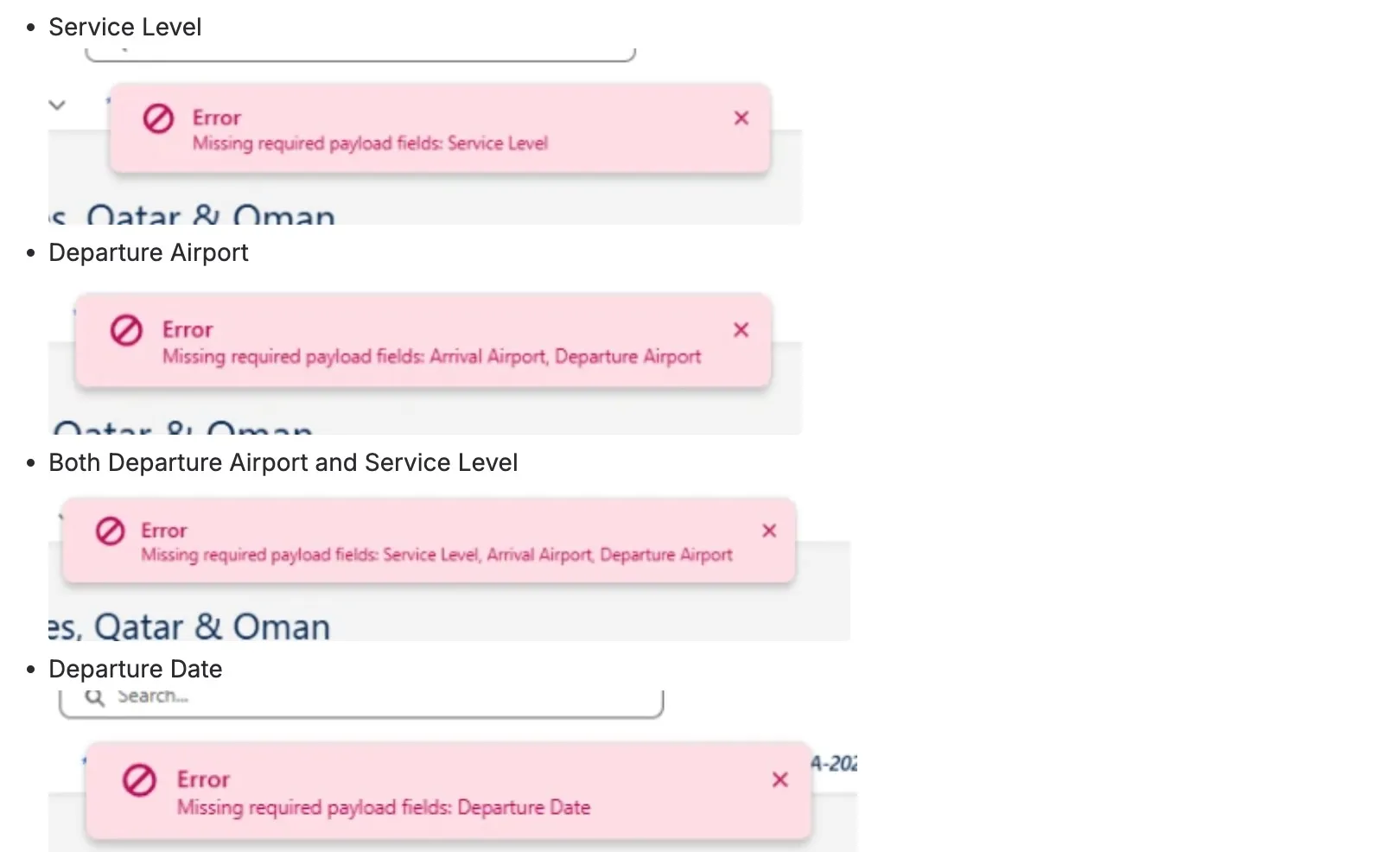
We’ve improved the error messaging when sending flight bookings to the GDS to make it clearer and more actionable. Previously, if required flight details were missing, users could receive unclear or generic error messages. With this update, the system now validates key information—such as service level, travel dates, and airports—before sending the request, and provides a clear message highlighting exactly which fields are missing. This helps users quickly identify and correct any gaps in their setup, reducing failed submissions and improving the overall booking experience. See below examples:
Store data in Salesforce from Connect response for PNR status (ST-3063)
Storing ticketed field from Rightrez in salesforce PNR object
Setting proper cancel fees for flights - LWC component (ST-3062)
We have introduced permission-gated Cancel and Edit actions for the LWC Flight Component, along with distinct cancellation workflows for ticketed and non-ticketed PNRs. We have also fixed cancellation pricing to correctly handle Air fare price category and tax add-on service splits, and ensured commissions are accurately recalculated upon cancellation.
RightRez_PNR segments as itinerary items visible in the Booking Overview (ST-3072)
We have hidden zero-fee cancelled items, renamed flight categories to "Airfare" and "Airfare penalty", and included cancellation fees in the passenger total row.
Feature: Cancellations
Removing GPP/CPP After 10 Days Applies Money Paid and Lowers Balance Due (ST-3003)
This feature introduces a configurable lock that prevents protection plan changes in the Booking Wizard when a cancellation rule with a non-zero value is in effect for the passenger’s existing selection. The lock is per-passenger, applies only to modification and occupancy-change modes, and can optionally be overridden by users with a specific permission.
A new checkbox field BlockProtectionPlanChangeOnCancelFee__c has been added to AppSettings__c. When enabled, the Booking Wizard evaluates cancellation rules for each existing protection plan selection. If a non-waived rule with a value greater than zero is in effect today, the protection plan selection becomes read-only for that passenger.
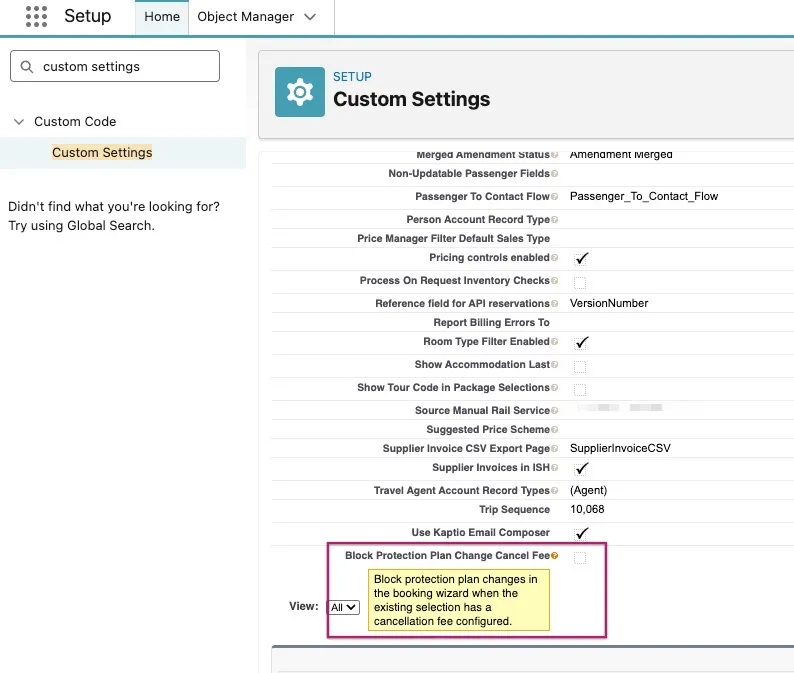
The Block Protection Plan Change Cancel Fee setting is disabled (false) by default, allowing the Protection Plan to be modified freely in both Modify Package and Change Occupancy.
When this setting is enabled (true), the Protection Plan cannot be modified in Modify Package or Change Occupancy.

The Booking Wizard options panel now shows:
-
A faded teal checkmark or ban icon on protection plan options that have locked passengers (opacity reduced to indicate restricted state, while preserving the recognisable selection colour).
-
A lock icon next to the option name when all passengers on that option are locked.
-
A lock icon next to the individual passenger checkbox when that passenger’s selection is locked and cannot be changed.
-
An amber warning icon next to the passenger checkbox when the user has the override permission and can proceed after confirmation.
New Custom Permission: Can Override Protection Plan Lock
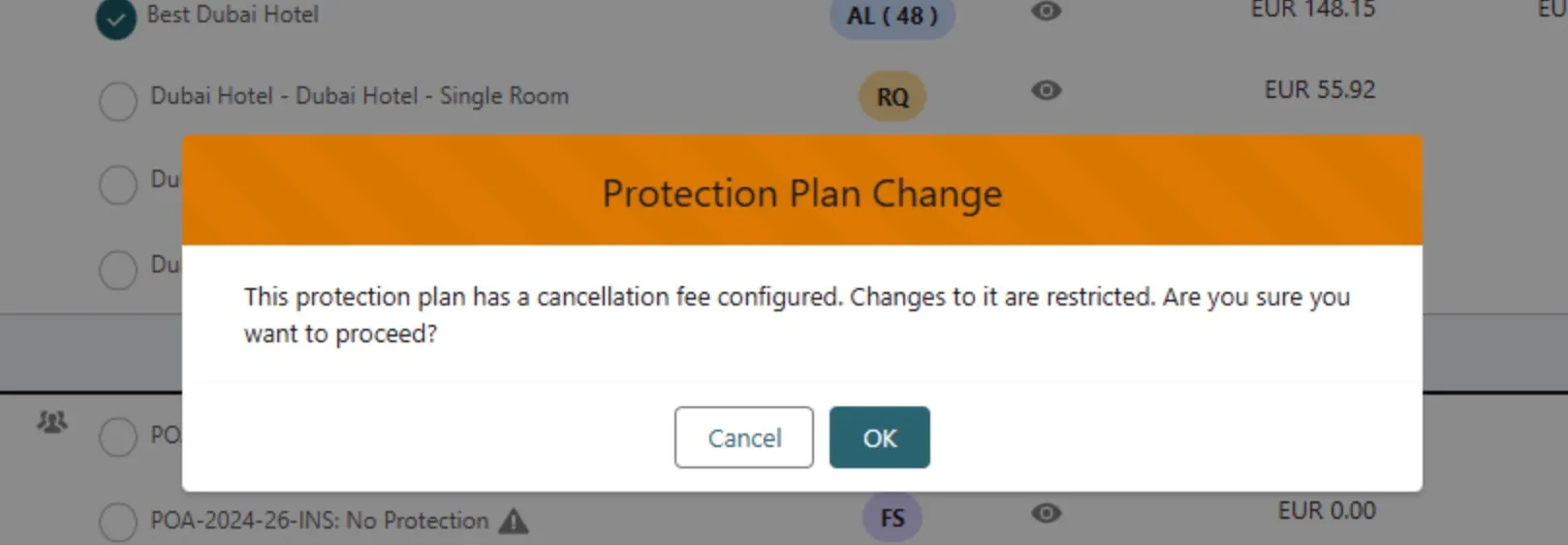
Users with the "Can Override Protection Plan Lock" custom permission can override this restriction but must confirm a warning dialog before each change. Without this permission, locked selections are fully read-only.
The following conditions apply even when the setting is enabled:
-
If the currently applied Protection Plan has no cancellation fee (e.g., due to non-generated itinerary cancellation rules), it can be reselected in Modify Package and in Change occupancy without restrictions.
-
If the active rule is within a grace period (value = 0), the Protection Plan can be reselected in Modify Package and in Change occupancy without restrictions.
-
In Transfer, there are no restrictions on selecting a Protection Plan, even if the source itinerary has cancellation rules applied.
Add flag to switch off Cancelation ASYNC job from spawning (ST-3076)
A new setting has been introduced to give greater control over when cancellation rules are generated during booking updates. With the "Skip Cancellation Rules on Save" option enabled (available at both user and organisation level), cancellation rule generation will be bypassed when saving changes from the Booking Overview. This helps improve performance and prevents unnecessary background processing during iterative booking edits. Cancellation rules will continue to be generated as normal when the setting is disabled, ensuring no change to existing behaviour unless explicitly configured.
The new setting is located in Kaptio Settings > User Overrides:
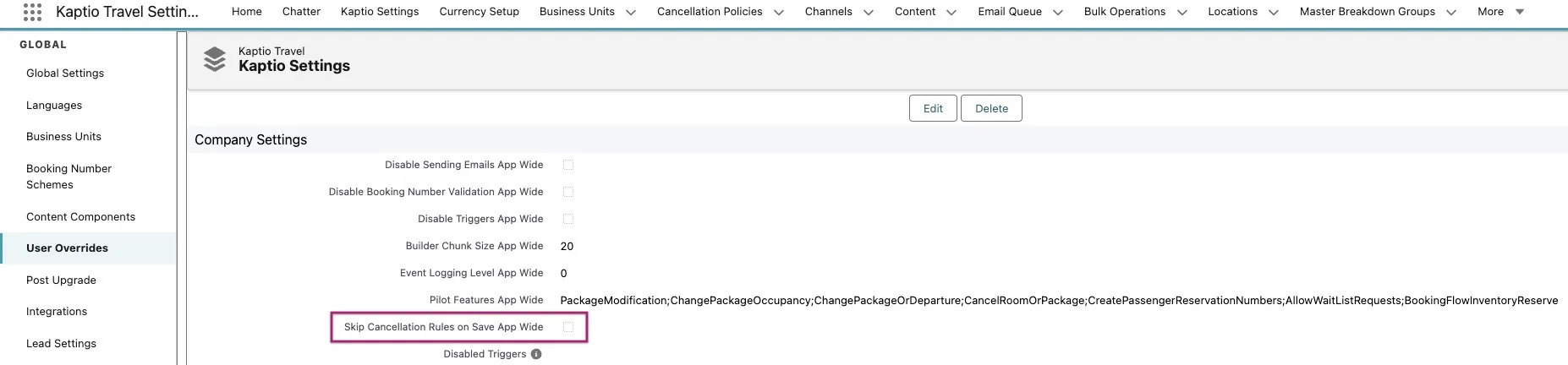
The setting is false by default, meaning itinerary cancellation rules are automatically regenerated based on changes made in Booking Overview (via Modify or Change Occupancy). When the setting is enabled (true), either at the organization or user level, the rules will not be regenerated, regardless of any changes made in the Booking Wizard (through Modify or Change Occupancy).
Bug Fixes
After Reset In Option tab user is unable to select Options due to errors after reset (ST-1720)
Fixed in an issue when resetting Options that was destroying the Temporary Hold instance. Without this subsequent selections in Options resulted in a Promise failure and error. This is now resolved.
Handle unlinked pax correctly while changing occupancy (ST-1784)
We’ve improved the behaviour of passengers added during Change Occupancy to better reflect how they are managed within the current session. Previously, when a newly added "TBD" passenger was linked to a contact and then unlinked, they were incorrectly moved to the Cancelled section and the contact became unavailable for reuse. With this update, unlinking a contact from a passenger created in the current session now resets the passenger back to a TBD state instead of cancelling them. The unlinked contact is also made available again for selection, ensuring a smoother and more intuitive booking experience when managing passengers and room allocations.
Tooltip not fully visible while managing Itinerary Groups (ST-2542)
Fixed an issue where the tooltip for the Primary Passenger label in the Manage Itinerary Groups dialog was partially obscured and not fully visible. The tooltip now correctly displays the entire text, improving clarity and usability when managing passengers in multi-room itineraries.
Promotions_promotion removed from 1st room once Promo Code applied to the 2nd room (ST-2611)
Resolved an issue where applying a promo code to one room could unintentionally remove an existing promotion from another room in multi-room bookings. Promotions are now correctly maintained per room, ensuring that previously applied offers (such as automatic promotions) remain intact when additional promo codes are applied to different rooms. This improves consistency and accuracy of promotion application throughout the booking flow.
Changing date via Monthly Calendar throws an error while Changing Occupancy (ST-2807)
Added logic to suppress the monthly prices icon and action if in a Booking Wizard > Change Occupancy flow.
Auto Expand Package Search Results when Changing Occupancy (ST-2844)
Made a UI improvement when in Booking Wizard > Change Occupancy flow to auto-expand the package to reduce the number of clicks required to get back into Booking Wizard.
At change occupancy flow on selecting pre/post stay in On Request (RQ) status running into error (ST-3023)
After the fix, now in Change Occupancy we correctly take into account the allotment day changes from cancelled room. For example, when the last Allotment (AL) unit is consumed by a double room, the system falls back to On Request (RQ), as per what has been configured. However, when a Change Occupancy occurs (changing a double into two singles), it releases one Allotment (AL) unit. As a result, only one of the two single rooms can consume this available Allotment (AL) unit, since fallback to On Request (RQ) is not possible within the same session. The first room will therefore consume the available Allotment (AL) unit. After saving, the second room can add the same service as On Request (RQ) through the Modify feature.
Enhance RightRez Callback Retry Logic (ST-3036)
The scheduled jobs by the RightRez callback do not retry if Connect API response was successful and it failed afterwards.
On Request (RQ) Option Not Selectable in Modify Flow (ST-3041)
After the fix user can select the night after the previously Sold Out (SO) night for both On request (RQ) and Allotment (AL) statuses.
RightRz Manual refresh improvements for cost only updates (ST-3042) (ST-3043)
This update improves the handling and persistence of fare and tax data during PNR import and refresh flows. It introduces explicit support for commissioned taxes by separating their processing from standard taxes, ensuring they are correctly saved during cost-only updates. Additionally, the change preserves and maps new fields--Fare Type and Tax Type--when rebuilding DTOs from existing records, preventing data loss during refresh operations. Selector queries and DTO constructors have been updated accordingly, and test coverage has been expanded to validate that cost updates and metadata (including commissioned tax behaviour) are consistently retained.
After Cancellation Pre and Post is visible only once, which cause Price Before Cancellation wrong also Promotion is not included (ST-3057)
This update improves how cancelled itinerary items are grouped and displayed in Booking Overview, particularly for pre- and post-stay services. The system now tracks the latest modified version of a service per passenger and component, ensuring only the most recent instance is shown when multiple updates exist, reducing duplication and confusion. Pre/post stay items are also handled more accurately by incorporating travel dates into grouping logic, preventing unintended merging of separate nights. Additionally, new metadata such as component ID and last modified date is captured to support this logic, resulting in a clearer and more reliable view of cancelled items.
After Transfer/Change Occupancy all items are visible in Itinerary we transferred from (ST-3059)
We’ve improved the accuracy of itinerary items shown after a room transfer following a Change Occupancy or Modify Package. Previously, the original itinerary could display all historical items, including those that had been replaced or removed during the modification process. With this update, only the items that were active at the time of transfer are shown, while outdated or replaced items are excluded. Items from components that were not modified, such as post-stay or protection plans, will continue to appear as expected. This provides a clearer and more accurate view of the transferred booking.
The Tour price is not visible as Price Before Cancellation when cancelling remaining pax after change occupancy in Cruise package (ST-3060)
We’ve fixed an issue where the "Price Before Cancellation" value could display incorrectly when cancelling passengers in multiple steps (for example, after a Change Occupancy action followed by a full room cancellation). Previously, the remaining passenger could show a value of 0 instead of the original tour price. With this update, the system now correctly retains and displays the full price prior to cancellation, ensuring accurate and consistent pricing information throughout the cancellation process.
Booking Overview: Remove package code prefix and bullet points (ST-3064)
Introduces minor changes to the UI of Booking Overview. Package code has now been removed from Package. Additionally ItineraryItems that are grouped are no longer prefixed with a bullet point.
Though cabin category inventory is available the cabin rooms are not displayed in booking wizard (ST-3074)
Fixed an issue where cabin would not be freed on itinerary lapsing when the itinerary lost status has been configured to Lapsed in Kaptio Settings
Currency values visible in the cancellation modal (Flights tab) (ST-3091)
We’ve improved the usability of penalty entry within Air Tickets by making currency values clearer and more consistent. The penalty field now displays the relevant currency code directly alongside the input and uses a standard decimal format, ensuring users can enter precise amounts without automatic currency formatting. This makes it easier to understand and input penalty values accurately, especially when working across different currencies.